Vercel Deployment
Post deployment status directly to your PRs as Vercel builds and deploys preview environments.
What You’ll Build
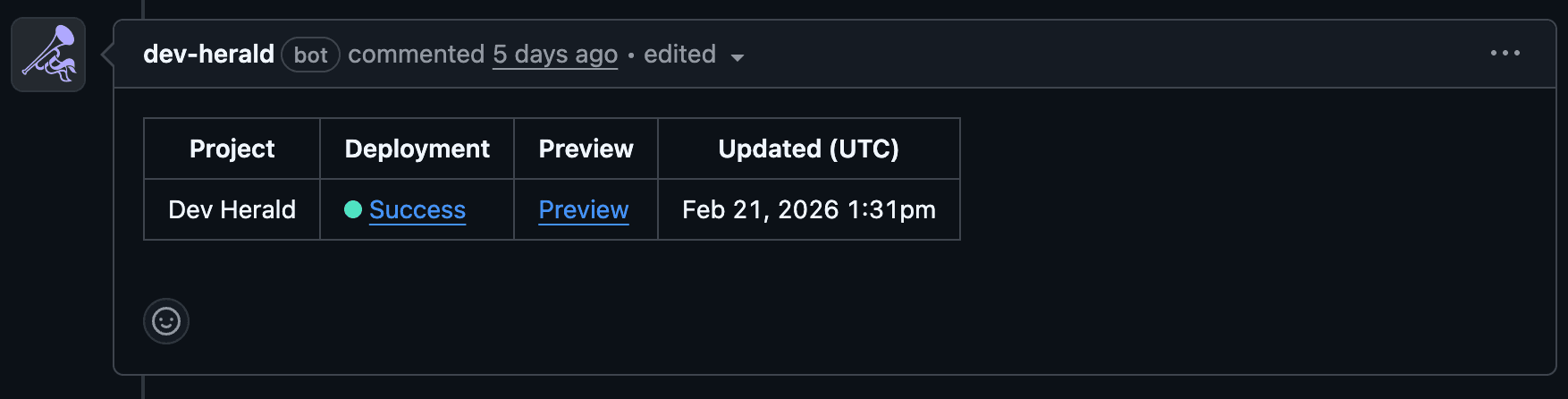
A comment that updates in place — starting as “building” while your CI runs, then resolving to success with a preview URL (or failure) once the deployment completes.
Add secrets to your repository
Add the following secrets in your GitHub repository settings under Settings → Secrets and variables → Actions:
| Secret | Description |
|---|---|
DEV_HERALD_KEY | Your Dev Herald API key |
VERCEL_TOKEN | Your Vercel personal access token |
VERCEL_ORG_ID | Your Vercel organization ID |
VERCEL_PROJECT_ID | Your Vercel project ID |
You can find your VERCEL_ORG_ID and VERCEL_PROJECT_ID in two ways:
- Vercel dashboard — go to your project settings, then the General tab
- CLI — run
vercel linkin your project directory and check the generated.vercel/project.json
Create the workflow
Add a workflow file at .github/workflows/preview.yml:
name: Preview Deployment

on:
  pull_request:
    types: [opened, synchronize, reopened]

env:
  VERCEL_ORG_ID: ${{ secrets.VERCEL_ORG_ID }}
  VERCEL_PROJECT_ID: ${{ secrets.VERCEL_PROJECT_ID }}

jobs:
  deploy-preview:
    runs-on: ubuntu-latest
    steps:
      - name: Checkout code
        uses: actions/checkout@v4

      - name: Install Vercel CLI
        run: npm install --global vercel@latest

      - name: Pull Vercel Environment Information
        run: vercel pull --yes --environment=preview --token=${{ secrets.VERCEL_TOKEN }}

      - name: Post Building Status
        uses: dev-herald/comment@v1
        with:
          api-key: ${{ secrets.DEV_HERALD_KEY }}
          pr-number: ${{ github.event.pull_request.number }}
          template: DEPLOYMENT
          sticky-id: vercel-deployment
          template-data: |
            {
              "projectName": "My App",
              "deploymentStatus": "building",
              "showTimestamp": true
            }

      - name: Build Project Artifacts
        run: vercel build --token=${{ secrets.VERCEL_TOKEN }}

      - name: Deploy to Vercel
        id: deploy
        run: |
          DEPLOYMENT_URL=$(vercel deploy --prebuilt --token=${{ secrets.VERCEL_TOKEN }})
          echo "deployment_url=$DEPLOYMENT_URL" >> $GITHUB_OUTPUT

      - name: Post Deployment Status
        if: always()
        uses: dev-herald/comment@v1
        with:
          api-key: ${{ secrets.DEV_HERALD_KEY }}
          pr-number: ${{ github.event.pull_request.number }}
          template: DEPLOYMENT
          sticky-id: vercel-deployment
          template-data: |
            {
              "projectName": "My App",
              "deploymentStatus": "${{ steps.deploy.outcome == 'success' && 'Ready' || 'Failed' }}",
              "previewLink": "${{ steps.deploy.outputs.deployment_url }}",
              "showTimestamp": true
            }
How It Works
Both steps share the same sticky-id: vercel-deployment, so the second step updates the comment created by the first. Your PR always shows one clean comment that transitions from “building” to its final state.
The if: always() on the final step ensures the comment updates even when the build fails — that’s when you need the visibility most.
Next Steps
- See all available deployment template fields
- Learn how sticky comments work under the hood